CRM Kanban Boards: Visualize Your Pipeline With Drag-and-Drop Stage Management

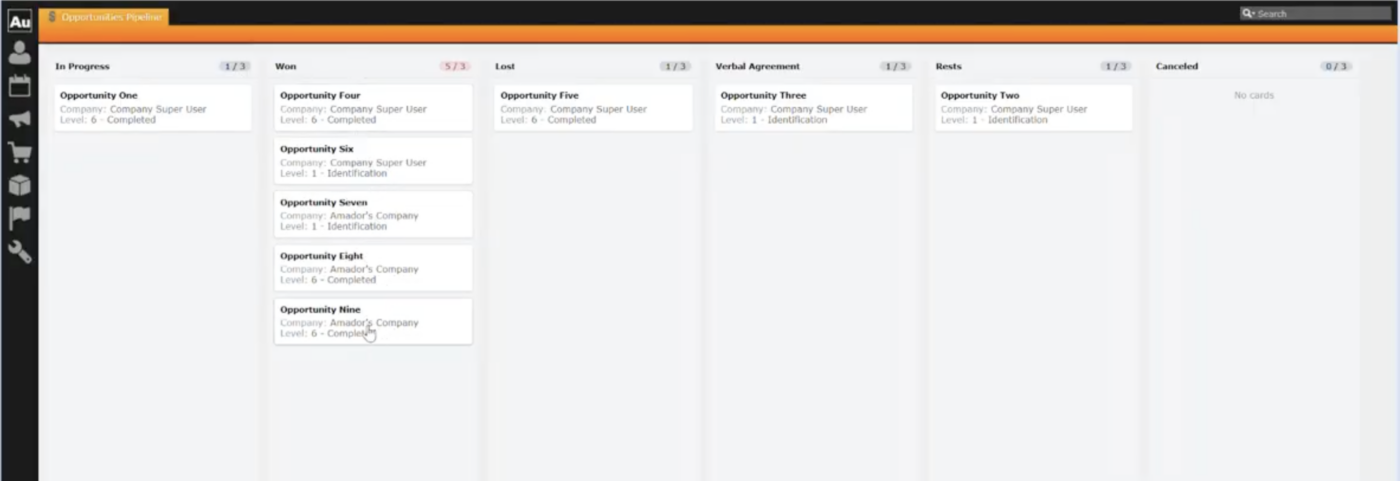
Lists are great for searching. They’re less great for seeing where things stand.
When you’re managing a sales pipeline, tracking service cases, or working through any process that moves records from one stage to another, what you really want is a visual board: columns for each stage, cards for each record, and the ability to move things along with a simple drag and drop.
That’s exactly what Kanban Boards bring to Aurea CRM.
Visual pipeline management inside your CRM
Kanban Boards give your team a column-based, visual view of any set of CRM records, grouped by a status or stage field. Each column represents a stage, and each card is a live record. You can see at a glance how many deals are in qualification versus negotiation, which service tickets are waiting for response, or where your onboarding cases are stacking up.
And because the boards are fully interactive, moving a record to the next stage is as simple as dragging its card to the next column. The underlying CRM record updates automatically.
Drag-and-drop CRM workflows with built-in safeguards
Kanban Boards are designed to be useful from the first day, with capabilities that match real-world sales and service workflows:
- Drag-and-drop stage changes. Move a card between columns and the record’s status field updates in the CRM. No forms to open, no fields to find.
- Confirmation prompts for critical moves. For processes where a stage change should be deliberate, administrators can require a confirmation step before the move commits.
- Work-in-progress (WIP) limits. Set a cap on how many items should sit in any given column. When a column exceeds its WIP limit, the board flags it visually, so bottlenecks surface before they become problems.
- Large dataset support with paging. Boards with many records load an initial page per column and let users load more as needed, keeping performance fast and manageable.
- Localized column headers. Column labels are drawn from your CRM catalog values in the user’s language, so your German team sees German stage names without any extra configuration.
Fully configurable Kanban boards in the CRM Designer
Every board is defined in the ACRM Designer, giving administrators full control without needing engineering support:
- Works with any CRM entity. Kanban Boards work with Opportunities, Activities, or any Info Area that has a catalog-based status field. You’re not locked into a single use case.
- Configurable grouping field. The field your columns are based on is configurable. Use opportunity stage, ticket status, onboarding phase, or whatever fits the workflow.
- Control which fields appear on each card. Administrators choose a field group that determines what information displays on each card, so users see what matters most.
- Per-column customization. Set custom colors, display order, WIP limits, and visibility per column. Hide stages that don’t apply, reorder them to match your process, and resync from the catalog when values change.
- Add boards to any CRM menu. A built-in action template lets administrators attach a board to any menu entry, so teams find it exactly where it makes sense in their workflow.
Permission-aware CRM boards
Kanban Boards honor Aurea CRM’s existing rights model. If a user doesn’t have update rights on the status field, the board displays as read-only for them. Cards they can’t modify are locked automatically. There is no separate permission layer to manage; the board simply follows the CRM rules you’ve already set.
Kanban board use cases for sales, service, and operations
The most common use case is sales pipeline management: opportunities arranged by stage, with drag-and-drop to advance or regress a deal. But because boards work with any Info Area that has a catalog grouping field, teams use them for a range of CRM workflows:
- Sales pipeline. Drag opportunities through qualification, proposal, negotiation, and closed stages.
- Service case tracking. Track cases from open to in progress to resolved.
- Customer onboarding. Move new customer setups through intake, configuration, training, and go-live.
- Any staged CRM process. If you track it with a status field today, you can visualize it on a Kanban board.
Get started with CRM Kanban Boards
A detailed setup guide is available in the Aurea Community. Book a call with your Account Manager to get started.
Your records have always moved through stages. Now you can see it happen.
Keep reading in Worx
Discover more blogs and docs in our customer community.