Opportunity Scoring: Explainable Deal Health Scores That Run On-Premise

Every sales team has the same problem. Dozens of open opportunities sitting in the pipeline, each one asking for attention, and no clear signal telling you which deals actually need it right now. The deals that are quietly stalling don’t wave a flag. The ones about to slip don’t look any different from the ones that are fine.
Opportunity Scoring in Aurea CRM changes that. Every open opportunity gets a clear, explainable deal health score that tells you how healthy the deal is, why it scored the way it did, and what to do next. And because it’s built on Aurea CRM’s on-premise AI engine, your deal data never leaves your network.
How CRM opportunity scoring works
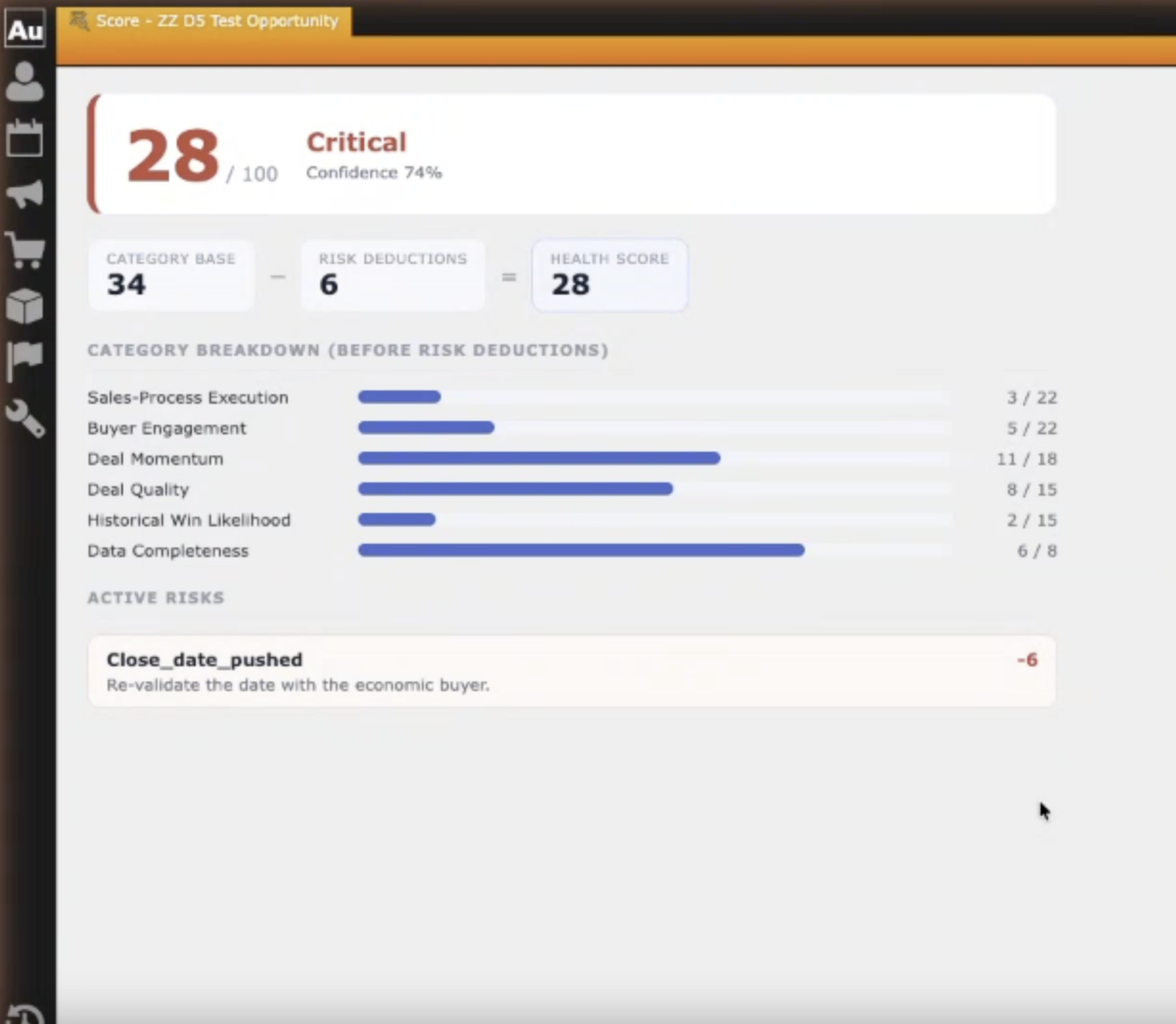
Each opportunity receives a deal health score from 0 to 100, plus a letter grade (A through D), updated automatically every night and whenever something meaningful changes on the deal. The score is computed by a deterministic rules engine, not generated by an AI model. That means the same deal state always produces the same score. No randomness, no black box.
The score is built from signals your CRM already tracks:
- Stage velocity. How long the deal has been in its current stage compared to your typical deal at that stage.
- Activity recency. How recently your team engaged with this account, and how varied that engagement has been.
- Stakeholder coverage. How many contacts are involved, and whether a decision-maker is among them.
- Close-date stability. Whether the expected close date has been pushed out, and how many times.
- Stage momentum. Whether the deal has been moving forward or sliding backward over the last 90 days.
- Offer status. Whether a quote has been issued, how old it is, and whether it’s been responded to.
Every scoring factor is visible alongside the score, showing not just the signal but its actual impact on the number, positive or negative. When a rep asks “why did this deal score 42?” the answer is right there.
AI-powered deal explanations, not AI-generated scores
Aurea CRM’s local AI engine adds a plain-language explanation layer on top of the deal health score. Instead of reading a table of factor contributions, your reps see a short, readable summary: what’s driving the score, what’s pulling it down, and whether anything looks unusual.
This is where the architecture matters. The AI does not compute the score. It narrates the score the engine already calculated. If the AI service is unavailable for any reason, the scores, factor tables, and pipeline views all keep working exactly as they should. You get a structured fallback instead of prose, but you never lose the deal health score itself.
Next Best Action: AI-recommended next steps for every deal
A deal health score is useful. A score with a recommended next step is more useful.
Based on the scoring factors, the system suggests a concrete Next Best Action: schedule a call, re-engage the decision-maker, refresh an expiring offer, update the close date. Each AI recommendation shows which factors drove it, so reps understand the reasoning before they act.
The key word is suggest. Every recommended action requires a deliberate click to accept. Accepting opens a prefilled activity creation screen that goes through the standard CRM validation and rights checks. Nothing is written to your CRM without your rep’s explicit approval.
Sales rep feedback that improves deal scoring over time
Scores aren’t always right, and we built the system knowing that. When a rep disagrees with an opportunity score, they can say so directly from the score panel, adding a comment explaining why. The system extracts the reasoning, applies a bounded adjustment to that specific deal, and queues the feedback for review.
Over time, accumulated feedback produces evidence-based proposals in the admin console. For example: “Factor F05 was disputed in 34% of feedback; the disputing reps were right in 71% of resolved cases; proposed weight reduction from 10 to 6.” No adjustment to the scoring model ever takes effect without an explicit admin approval. There is no silent drift.
Machine learning deal scoring when your data is ready
The initial scoring engine works from day one with zero historical data. It uses configurable, weighted heuristics that your administrators can tune.
When your organization has enough closed deal history (at least 150 won and 150 lost opportunities within 36 months), the system offers to train a learned model on your own data, entirely on your server, with no cloud dependency. The learned model is calibrated so that a score of 70 means approximately a 70% chance of winning. It sits alongside the baseline as a “challenger” until your admin explicitly promotes it, and rollback is always available.
Both scoring tiers produce the same explainable factor output, so your reps see the same interface regardless of which engine is active.
On-premise scoring: your deal data never leaves your network
This matters for our customers, and we want to be explicit about it. Opportunity Scoring runs on Aurea CRM’s on-premise AI engine. No deal data, no prompts, and no model responses leave your server. The system works in fully airgapped environments. For organizations that prefer to use their own hosted model, a bring-your-own-model option connects it as the engine behind the same features and safeguards.
Competitors score opportunities in their cloud. We score them in yours.
Deal health scores across every CRM surface
The opportunity score appears everywhere it’s useful:
- On the opportunity record as a score panel with the full factor breakdown, trend indicator, AI summary, and Next Best Action card.
- On the pipeline list as a sortable, filterable score column with a 7-day trend, so managers can scan the full pipeline by deal health at a glance.
- On the Action Hub dashboard as feed alerts when a deal drops significantly, so at-risk opportunities surface in the daily workflow without anyone having to go looking.
Full administrator control over scoring configuration
Your administrators have full visibility and control over how opportunity scoring works:
- Enable or disable individual scoring factors and adjust their weights, with a preview of how the change would affect your current pipeline before saving.
- Manage the Next Best Action catalog: add actions, disable defaults, and map actions to activity templates.
- Review the feedback queue and approve or reject proposed model adjustments.
- Monitor model health: training-data readiness, calibration quality, version history, and one-click rollback.
- Toggle AI narration, Next Best Action, and the scoring engine independently. Turning off the AI prose never affects the deal health scores themselves.
Get started with Opportunity Scoring
A detailed setup guide is available in the Aurea Community. Book a call with your Account Manager to get started.
Your pipeline has always had signals. Now every deal tells you exactly where it stands.
Keep reading in Worx
Discover more blogs and docs in our customer community.